Context
The Context tab allows your agent to fetch, transform, and remember important information right before a call starts. By providing real-time data and historical memory, your agent can have highly personalized, intelligent, and context-aware conversations from the very first second.
To get started, navigate to Agents -> Select Agent -> Context. You will find three powerful tools: Pre Call API, Task Context Enrichment, and Conversation History.
1. Pre Call API (Fetching Live Data)
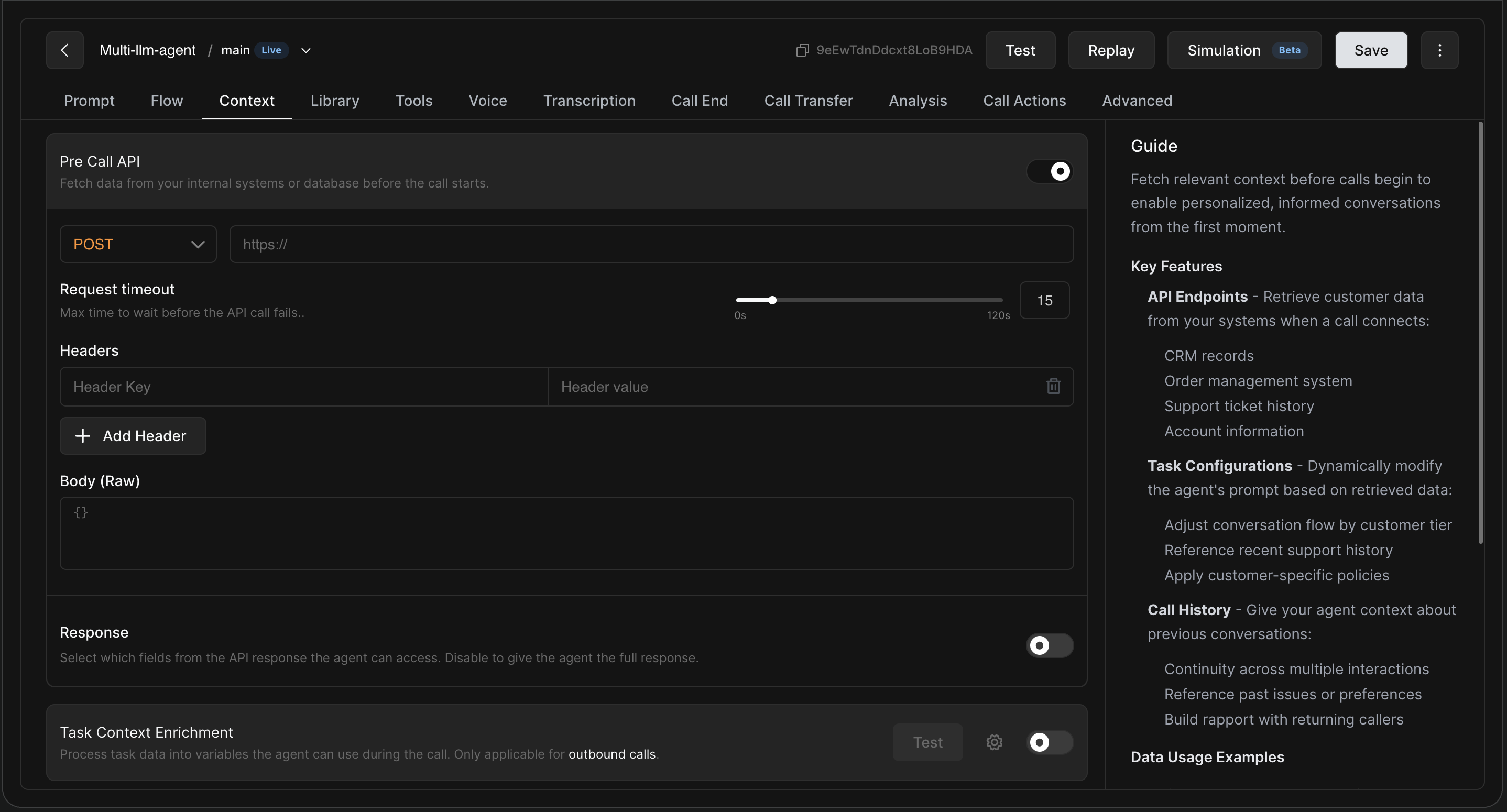
This endpoint enables your agent to securely fetch contextual information from your CRM or internal database the moment a call connects.
How to Configure?
Toggle Pre Call API to enabled, and fill out your endpoint details:
-
Method & URL: Select the HTTP method (e.g.,
POSTorGET) and enter your endpoint URL. You can use query-string variables here likehttps://crm.example.com/lookup?phone=${caller}. -
Request Timeout: Use the slider to set the maximum time (in seconds) the agent should wait for your server to respond before aborting the API call and continuing with the default prompt.
-
Headers: Add necessary headers, such as authentication tokens or
"content-type": "application/json". -
Body (Raw): If using POST/PUT, define the JSON body. You can inject system variables like
${caller}(the user's number) or${callee}(your agent's number) to query your database. -
Response: Toggle this to selectively map which JSON properties from your server's response become available variables inside the agent's prompt.
Once configured, you can reference the retrieved data in your main prompt using the format ${variable_name} (e.g., "Greet the customer by saying: Hi ${customerName}! I see you are a ${customerTier} member.").
2. Task Context Enrichment (Data Transformation)
When you upload a list of leads for an outbound campaign, the raw data is often messy. Names might be hard for the AI to pronounce, numbers might lack formatting, or you might want to dynamically generate a unique sales strategy based on a lead's CRM tags.
Instead of overcrowding your main agent prompt with formatting instructions, Task Context Enrichment uses a separate LLM to clean and transform your data before the call starts.
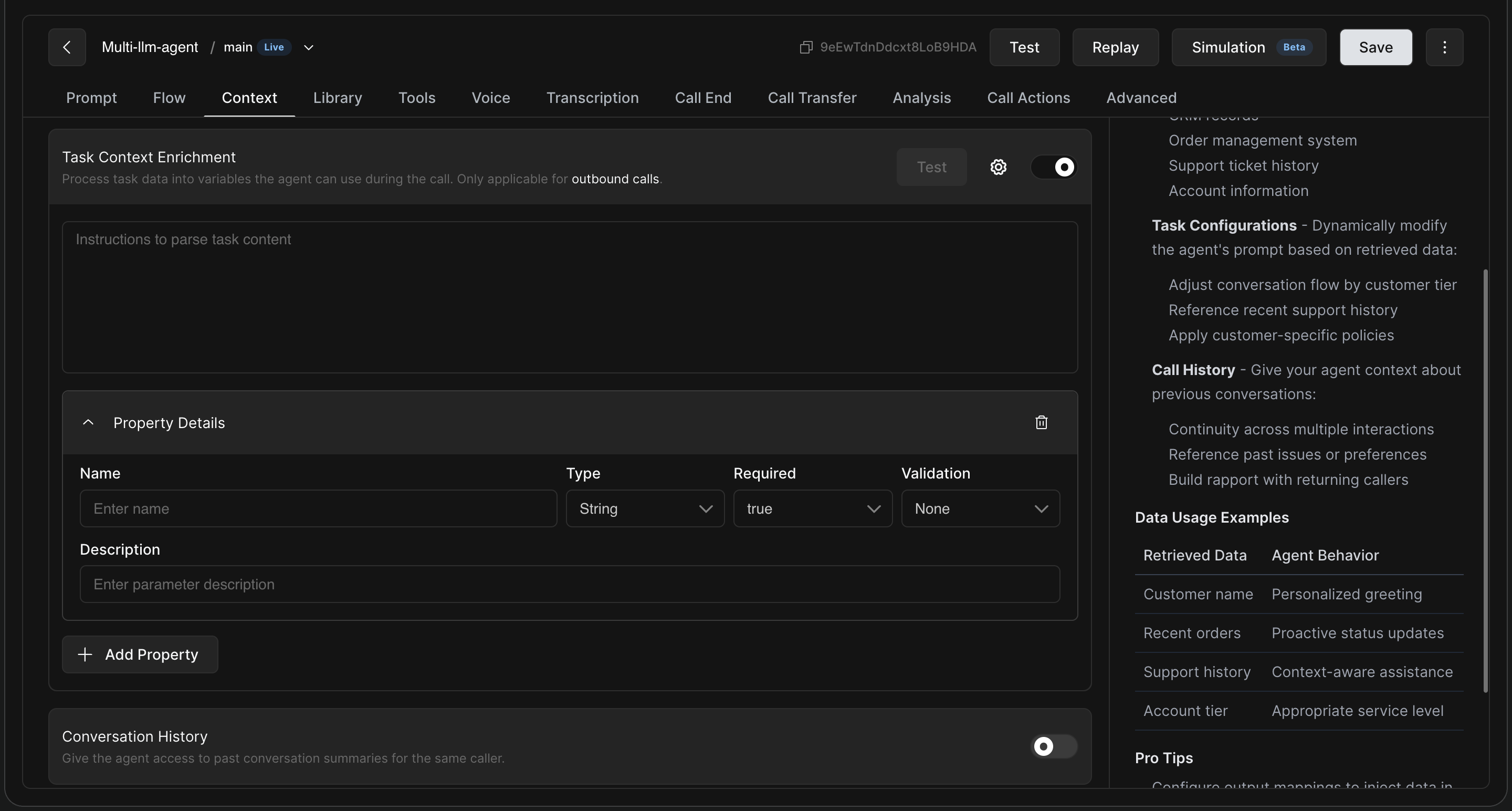
Note: This feature is only applicable for outbound calling tasks.
How to Configure?
-
Prompt: Write clear instructions for the pre-call LLM to parse the task content. (Example: "Clean the user's name to ensure proper pronunciation. If the user is a VIP, generate a custom
opening_lineacknowledging their loyalty.") -
Property Details: Click + Add Property to define the new, cleaned variables the pre-call LLM will generate.
-
Name: The new variable name (e.g.,
opening_lineorclean_name). -
Type: String, Number, etc.
-
Required: True/False.
-
Validation: Apply custom Regex if you need the output strictly formatted.
-
-
Use it in the Agent: Go back to your main agent prompt and inject the newly enriched variables (e.g.,
${clean_name}).
3. Conversation History (Agent Memory)
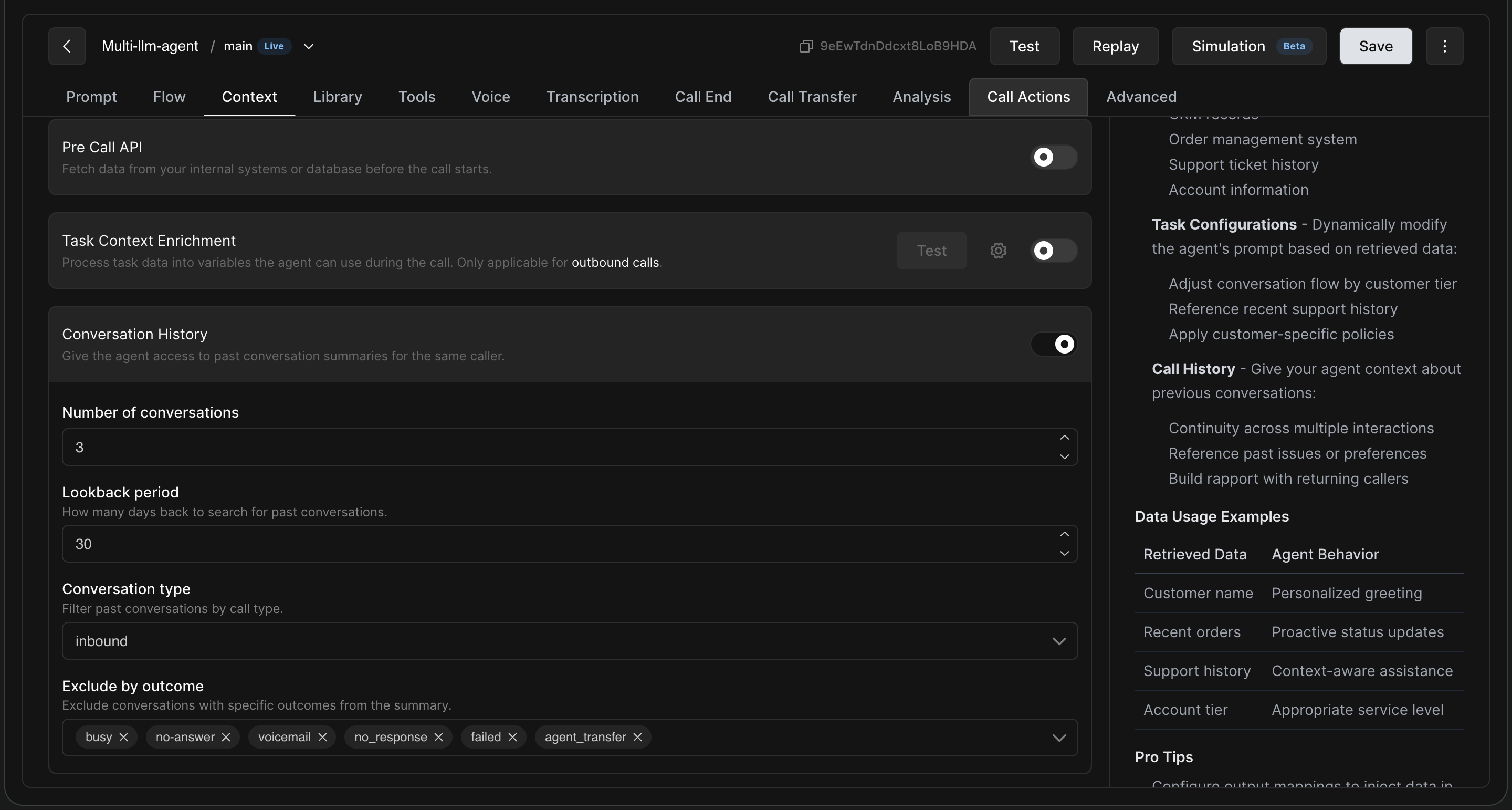
Give your agent the ability to remember returning callers! When enabled, the agent automatically retrieves past conversation summaries associated with the caller's phone number, allowing for seamless continuity across multiple interactions.
How to Configure:
-
Number of conversations: Choose how many past interactions the agent should be able to "remember" and reference (e.g., the last 3 calls).
-
Lookback period: Define how many days back the system should search for past conversations (e.g., 30 days).
-
Conversation type: Filter whether the agent should remember past
inboundcalls,outboundcalls, or both. -
Exclude by outcome: Ensure the agent doesn't get confused by "junk" data. Use this dropdown to tell the system to ignore calls that ended in specific dispositions, such as
busy,no-answer,voicemail,failed, oragent_transfer.